No enforced sign-off
A task marked “done” carries no evidence of who did it, who reviewed it, or when.
Close checklist software
Spreadsheet checklists record that somebody ticked a box. This records who did the work, who reviewed it, what they attached, and when — and refuses to let one person both do the work and sign it off.
Built for NetSuite. Works with any ERP, including QuickBooks — and with no ERP at all.
The problem
Not because the team is careless. Because a spreadsheet cannot enforce anything.
A task marked “done” carries no evidence of who did it, who reviewed it, or when.
Several copies circulate. The roll-forward to next period is a copy-paste that silently drops or duplicates tasks.
Work that must not start until a predecessor finishes is governed only by convention.
Nobody can answer “where are we in the close, right now, by entity?” without going and asking people.
Supporting schedules live in email and shared drives, disconnected from the task they support. Audit sampling gets expensive.
Chronically late tasks and recurring bottlenecks stay invisible, because nothing is measured.
Solutions
Every solution is sold and billed on its own and switched on for your company when you buy it — but they share one database, one set of accounting periods and one set of segments, so the second product is not a second system to reconcile against the first.
The month-end close as a controlled system of record, across as many entities as you close.
Fixed assets, construction in progress, intangibles and right-of-use assets in one register.
Revenue recognition, payment tracking, bill amortisation and bill tracking for subscription businesses.
A general ledger as simple as a small-business package and built like an ERP.
What it does
Memorized tasks carry day offsets and a frequency, never dates, so a template written once resolves correctly in every period — including the month whose end lands on a weekend.
Prepare, review, approve. The application refuses to let anyone review work they prepared, so the control is enforced rather than described.
A task set to require evidence cannot be submitted without it. Procedures, workpapers, and the technical references sit in the five sections a reviewer actually reads.
Map your export's own column headings once. No editing a file that was already correct because the software wanted different headings.
Every import lined up in period order, the movement between each pair of periods, and a flag on anything abnormal: a balance on the wrong side, an account that cleared, one that has not moved in three periods.
Every active metric computed against the prior period, a generic range, and the range for the industry the entity is actually in — with the source of those ranges printed beside them. It downloads as a Word document with the source trial balance as an appendix, ready to go to a lender or a board.
Every close measured against the same entity's own history: cycle time, the tasks that keep slipping, the people carrying too much, and how much reviewing is queued behind one person. It names what went well as specifically as what did not, and downloads as a report.
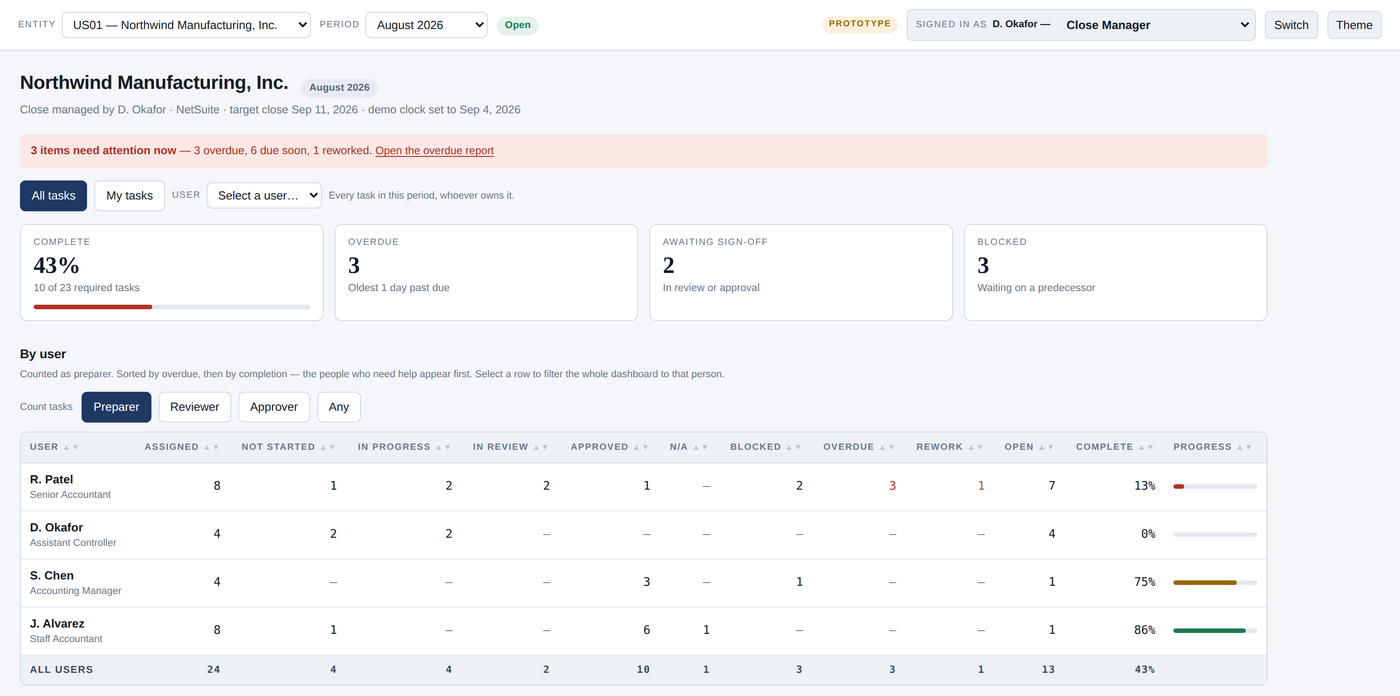
One row per entity: how far through the close it is, what is overdue, what is waiting on a signature, and who is accountable. A CFO can answer “are we closing on time” in fifteen seconds without asking anybody, so nobody spends the last week of the close writing status updates.
Entities roll up however many levels deep, with translation at the period-end rate. One person can prepare for one entity and review for another.
Business-day offsets are resolved against your own calendar — your working week, your non-working days — so a task due on BD+3 lands on a day your team is actually there. A company that works Sunday to Thursday says so, rather than being made to fit somebody else's week.
How far back a role can look is set on the role: the most recent few, this fiscal year, or all of it. The picker says how many older periods exist and are not shown, so a short list reads as a permission rather than as data gone missing.
Permission by permission, with data access down to the department and location. Every change is written with the actor, the moment, and the value before and after — in the same transaction as the change, so the record and the fact cannot disagree. Entries are never edited: a correction is a new entry. Filter by date, actor, record, or event, and export the result.
How it works
The software is the easy half. Getting your close into it, correctly, is the half that decides whether this works.
We start with your close as it runs today — the calendar, the people, the reconciliations that always slip, the things that are only in somebody's head.
Entities, categories, segments, the chart of accounts, users, tasks, and memorized tasks all import from CSV with your own column headings mapped in a preview step. Your close calendar becomes the first template.
The first close runs in both places. Nothing is switched off until the checklist has produced a clean period and the team believes it.
Each role gets a user guide generated from what that role can actually do at the moment it is downloaded, so nobody is reading last year’s description of their own job. You own the outcome; we do not become a dependency.
Who it is for
Straight talk is cheaper than a failed implementation. If it is not a fit we will say so on the call.
For CFOs and executives
That is a different question, and a spreadsheet checklist cannot answer it at all — it is thrown away and re-made every month, so there is nothing to compare this close against except somebody’s memory of the last one.
Liquidity, leverage, efficiency and profitability, computed from the trial balance your team already imported — not re-keyed into a separate model that is a month behind and one typo from wrong.
Every figure states the basis it was computed on, and refuses rather than guesses when the data will not support it. A ratio that quietly annualises a year-to-date column is worse than no ratio, because you will act on it.
On time, late, and late because the due date was wrong. Those are three different problems with three different fixes, and a single “days to close” figure hides all of them.
It reads by person, by category and by entity, and it tells a task that genuinely finished late from one whose date was moved to make it look early.
The tasks that are late every single month. The ones whose dates have been moved repeatedly. The reviews that sit longest. The steps nobody has questioned in two years.
This is the part that pays for the software. A close does not get faster because people work harder — it gets faster when the two or three things that hold it up every month are found and fixed.
Not a snapshot of this month: the movement across months, so an improvement you paid for shows up as an improvement rather than being asserted in a meeting.
Read-only and entity-aware, built from the same records the controller works in — so there is one account of how the close went, not a management summary that disagrees with the detail underneath it.
Executive and Approver are roles in the product, with their own permissions and their own written guide. An executive sees the close and its numbers; the permissions that change a checklist are deliberately not theirs, which is what makes the view worth trusting.
Why BOLD
The same five you get from BOLD Consulting, because it is the same practice and the same CPA.
Real accounting judgment behind the design, not just system configuration. Every rule in the software exists because it had to exist in a real close.
Plain-English updates and honest timelines. The application itself follows the same rule — when it refuses to do something, it says why in a sentence you can act on.
Documentation, generated user guides, and CSV export of every record type. Your data leaves as easily as it arrived.
We speak controller and CFO, and we speak NetSuite admin. The gap between those two is where close projects usually die.
The pieces an auditor asks for are produced by the close rather than reconstructed after it: enforced review, retained evidence, and an audit trail that records corrections as new entries rather than rewriting the old ones.
Not a row in a shared table with a filter over it. Your company is set up with a database of its own, and every request reaches it through the session you signed in with — never through anything the browser could name.
This is close management software, not a general ledger and not a substitute for one. It reads your trial balance; it does not replace your ERP.
The fastest useful conversation is thirty minutes with your current close calendar open. Bring the tasks that always slip.